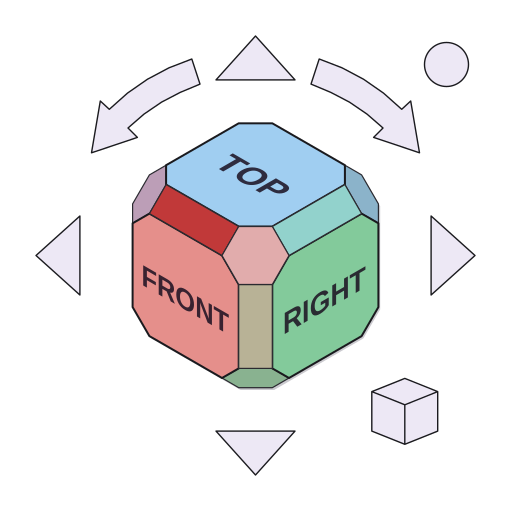
NavCube
NavCube is a 3D orientation cube widget for PySide6. Drop it into any 3D viewport — OCC, VTK, custom OpenGL, whatever you're using — and it just works. No renderer dependency, no shared OpenGL context, no lifecycle headaches.
Get Started View on GitHub PyPI
Why NavCube exists
NavCube grew out of real pain in Osdag, an open-source structural steel design tool built on PythonOCC. Osdag lets users open multiple design tabs, each with its own 3D renderer. We wanted a navigation cube on every tab — and that's where things got ugly.
OCC's built-in ViewCube lives inside the OpenGL context, sharing its lifecycle with the renderer. The moment you start creating and destroying tabs, you're fighting crashes: OCC objects outliving their context, double-free errors on tab close, the cube randomly rendering into the wrong viewport. The root cause is that the cube and the renderer are too tightly coupled — they live and die together.
The fix was to pull the cube out of OCC entirely. NavCube is a plain PySide6 QWidget that draws itself with QPainter. No OpenGL, no OCC handles, no shared context. When a tab closes, the widget goes away like any other Qt widget. The crashes disappeared.
The bonus: since the widget doesn't care about your renderer, it works with VTK, custom OpenGL, or anything else. So it became its own library.
How it works
NavCube talks to your renderer through exactly two hooks:
- You push the camera state in:
cube.push_camera(dx, dy, dz, ux, uy, uz) - It emits orientation changes out:
cube.viewOrientationRequested
That's the entire integration surface. The widget has no idea what's rendering behind it — and it doesn't need to.
Features
| Renderer-agnostic | The core widget only needs PySide6 + NumPy. No OCC, no VTK, no OpenGL required. |
| Ready-made connectors | OCCNavCubeSync and VTKNavCubeSync handle camera polling and signal wiring so you don't have to. |
| Full style control | 60+ fields in NavCubeStyle covering colors, fonts, labels, animation speed, and opacity. You can change everything at runtime. |
| Smooth animations | Quaternion SLERP with antipodal handling. No gimbal lock, no NaN crashes on 180° flips. |
| Z-up and Y-up | Z-up out of the box (OCC, FreeCAD, Blender). One-line subclass to switch to Y-up (Unity, Three.js). |
| Physical-size DPI | Uses physicalDotsPerInch + devicePixelRatio to target a consistent physical size (mm) on every display at every OS scale factor — 100 %, 150 %, 200 %, 4K Retina. Recalculates automatically when you move between monitors. |
Install
pip install navcube            # core only
pip install navcube[occ]       # + OCC connector
pip install navcube[vtk]       # + VTK connector
Try it now
Run this from your terminal or a Jupyter cell — it opens a live window with a working NavCube:
import sys
from PySide6.QtWidgets import QApplication, QWidget, QVBoxLayout, QLabel
from PySide6.QtCore import Qt, QPoint
from navcube import NavCubeOverlay

app = QApplication(sys.argv)
win = QWidget()
win.setWindowTitle("My First NavCube")
win.resize(800, 600)
win.setStyleSheet("background: #2b2d3a;")

label = QLabel("Click a NaviCube face to change the view")
label.setStyleSheet("color: #aab0c4; font-size: 14px;")
label.setAlignment(Qt.AlignCenter)
QVBoxLayout(win).addWidget(label)
win.show()

cube = NavCubeOverlay(parent=win)
cube.viewOrientationRequested.connect(
    lambda dx, dy, dz, ux, uy, uz:
        label.setText(f"Dir ({dx:+.2f}, {dy:+.2f}, {dz:+.2f})  Up ({ux:+.2f}, {uy:+.2f}, {uz:+.2f})")
)
cube.show()

def place_cube():
    pos = win.mapToGlobal(QPoint(win.width() - cube.width() - 10, 10))
    cube.move(pos)

place_cube()

_orig_resize = win.resizeEvent
_orig_move   = win.moveEvent
win.resizeEvent = lambda e: (_orig_resize(e), place_cube())
win.moveEvent   = lambda e: (_orig_move(e),   place_cube())

sys.exit(app.exec())
Click any face on the NaviCube and the label updates with the new orientation — that's the signal your real camera would respond to.
Quick start
from navcube import NavCubeOverlay

cube = NavCubeOverlay(parent=your_3d_widget)
cube.show()

cube.viewOrientationRequested.connect(your_camera_update)
cube.push_camera(dx, dy, dz, ux, uy, uz)
Sign convention quick reference
push_camera dx/dy/dz |
Inward (eye → scene) — same as OCC cam.Direction() |
viewOrientationRequested px/py/pz |
Outward (scene → eye) — ready for OCC SetProj() |
Acknowledgements
NavCube is directly inspired by FreeCAD's NaviCube — one of the best orientation controls in any open-source CAD application. The face layout, corner and edge hit regions, click-to-snap behaviour, and overall feel all follow FreeCAD's lead. Huge thanks to the FreeCAD team for setting such a high bar.